
From order to scan, step by step.
Here is exactly what happens, from ordering the plate to the first time someone scans it. You don’t need everything ready: start with one photo and add the rest later.
Questions at any step? Call (910) 241-4312
What you receive
- The plateLaser-engraved steel, made to last and easy to scan.
- Your portalYour secure place to build and manage the memorial.
- Their pagePhotos, videos, their story and voice, for anyone who scans.
The four steps
Step 1: Order the Legacy Package
Choose a finish and check out. At checkout, use the email address you want for the memorial account. Your memorial setup link is sent there.
- Pick your finish: black, gold, rose gold or silver.
- Check out securely and get your order confirmation by email.
- We laser-engrave your plate and prepare it for delivery.
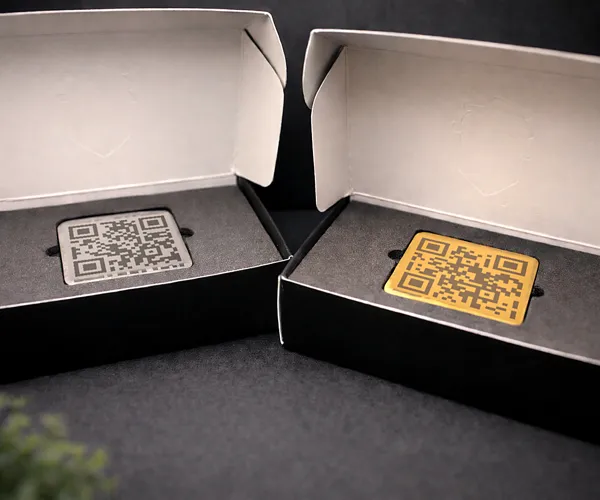
Silver and gold finishes, boxed. Step 2: Open your portal account
The portal is where you build and manage the memorial. If you already have an account, just sign in. If not, making one takes about a minute.
- Open the portal and choose Sign Up.
- Use the same email you used at checkout.
- Verify your email if asked. Then you’re ready to begin.
Your memorial is protected.Only you, and anyone you choose to invite, can manage it.
Step 3: Build their memorial
Inside the portal you create the page the plate opens. It guides you one step at a time. Prefer help? Call (910) 241-4312 and we’ll walk you through it.
- Add their name, dates and the details you want to include.
- Write a few words about them. You can change it any time.
- Upload photos, and short video clips of up to 30 seconds each.
- Add a life timeline and voice recordings.
- Invite family and friends to share messages and memories.
Who can see what- The main memorial page is public to anyone who scans the plate.
- Only people you approve can post in the guestbook.
- Approved family can create private personal pages only they can see. You manage access in your portal.
You can always come back.Add new photos and stories over the years, swap photos, or rework what you wrote whenever you’re ready.
Step 4: Place the plate
Put it where family will find it: a headstone, urn, bench or keepsake box. Anyone who scans it with a phone camera goes straight to the memorial page. No app needed.
- Clean the surface with the alcohol wipe provided.
- Make sure the area is completely dry.
- Peel off the adhesive backing.
- Press the plate firmly into place for 30 to 45 seconds.
- Let it cure for 24 hours before heavy weather or moisture.
Placing it on a headstone?Ask the cemetery first; many have rules about what can be attached.
Common questions.
Stuck at any step? Call (910) 241-4312 or write to support@legacyinmemoriam.com.
All FAQsCan I change the memorial later?
Yes. Add new photos, videos and stories, or change anything, whenever you like. The plate never needs to change.
Do I need to be good with computers?
Not at all. The portal walks you through each step, and our support team can help if you get stuck.
What happens when someone scans the plate?
Their phone camera opens the memorial page straight away, so they can see their page and remember your loved one. No app is needed.
Who can see the memorial page?
The main memorial page is public to anyone who scans the plate. Only people you approve can post to it, and approved family can create private personal pages that only they can see.
How long can videos be?
Video clips up to 30 seconds each, with 10 GB of storage for photos and videos together. Photos are unlimited.

Ready when you are.
$79.99 one time for the engraved plate, a lifetime memorial page and a lifetime warranty. No subscription. Shipping calculated at checkout.
A question first? Call (910) 241-4312 or write to support@legacyinmemoriam.com.